
In this article:
Why would I need Alternative Imagery?
Occasionally, the imagery available to Solo is not sufficient to use for a design. This most often happens when the customer's home was recently built or renovated. In these cases, there are alternative imagery options that can be used to deliver a design based on the customer's roof layout.
The most accurate, and Solo recommended, is to provide a top-down aerial image of the home to be used on the proposal, via Custom Build Image.
If that is not easily accessible, we can approximate a "blind" build to design according to the roof layout, but displayed on the imagery that we do have.
If the information needed for these two options is not available, our team can create a ground mount proposal with the desired system size so the proposal can still be used to estimate the customer's costs.
Please Note: Our team will do their best to create an accurate design with the imagery provided, however, alternative imagery options may see issues with scaling and correct measurements.
Uploading a Custom Build Image
A custom build image allows you to upload a picture to be used on the design, in place of the imagery provided by Solo. This can be useful when the home is a new build and updated imagery is not yet available for that location, or in circumstances where.
A few things must be done correctly to ensure the custom build image can be used accurately on the proposal:
- The image must be a top down/aerial view of the home to allow for panel placement on the different roof planes.
- The top of the image should be the North side of the home to produce accurate production evaluations.
- The image file type must be PNG.
- A measurement of some component of the image must be known to properly scale the panels onto the image (this can be the length of a roofline or even the length of a car featured in the photo).
Follow these steps to upload a custom build image as needed:
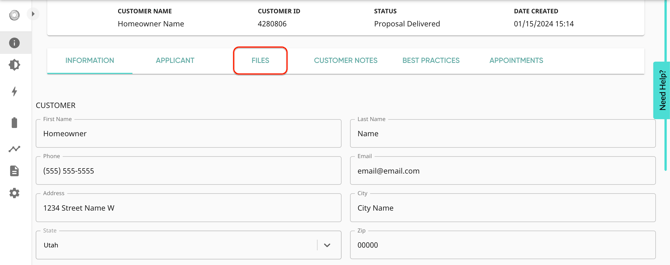
- While in the customer information page, go to the 'Files' tab.
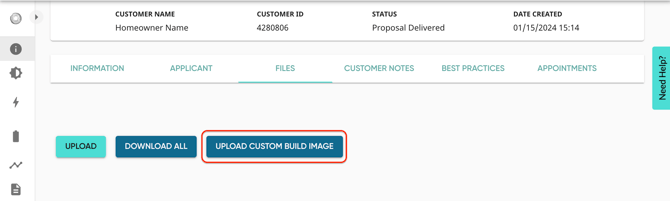
- Press the 'Upload Custom Build Image' button.
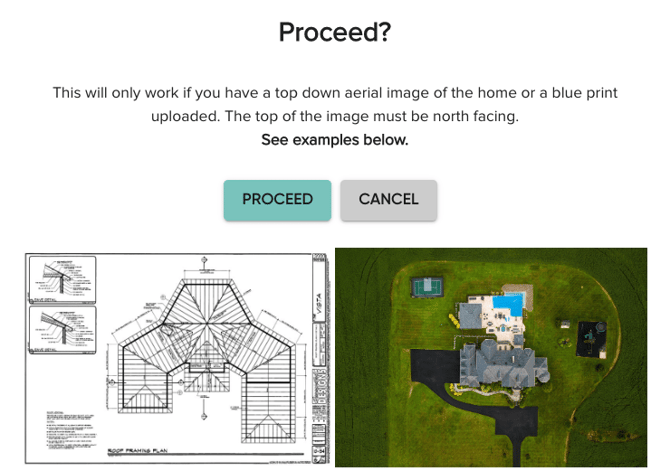
- Make sure you have a north-facing, top-down aerial image of the home. This is the only way a custom-build image upload will work.
- The file type of the uploaded image must be a PNG to work.
- The file type of the uploaded image must be a PNG to work.
- If you have the required image, tap "Proceed".
- Search and select the images/blueprint from your device's files.
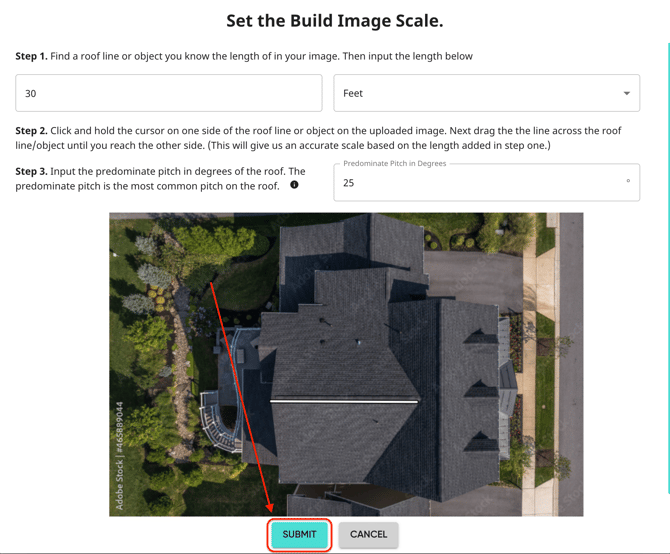
- To properly scale the image, we'll need the measurement of a roofline. Click and drag to draw a line along the roof plane you have measured.
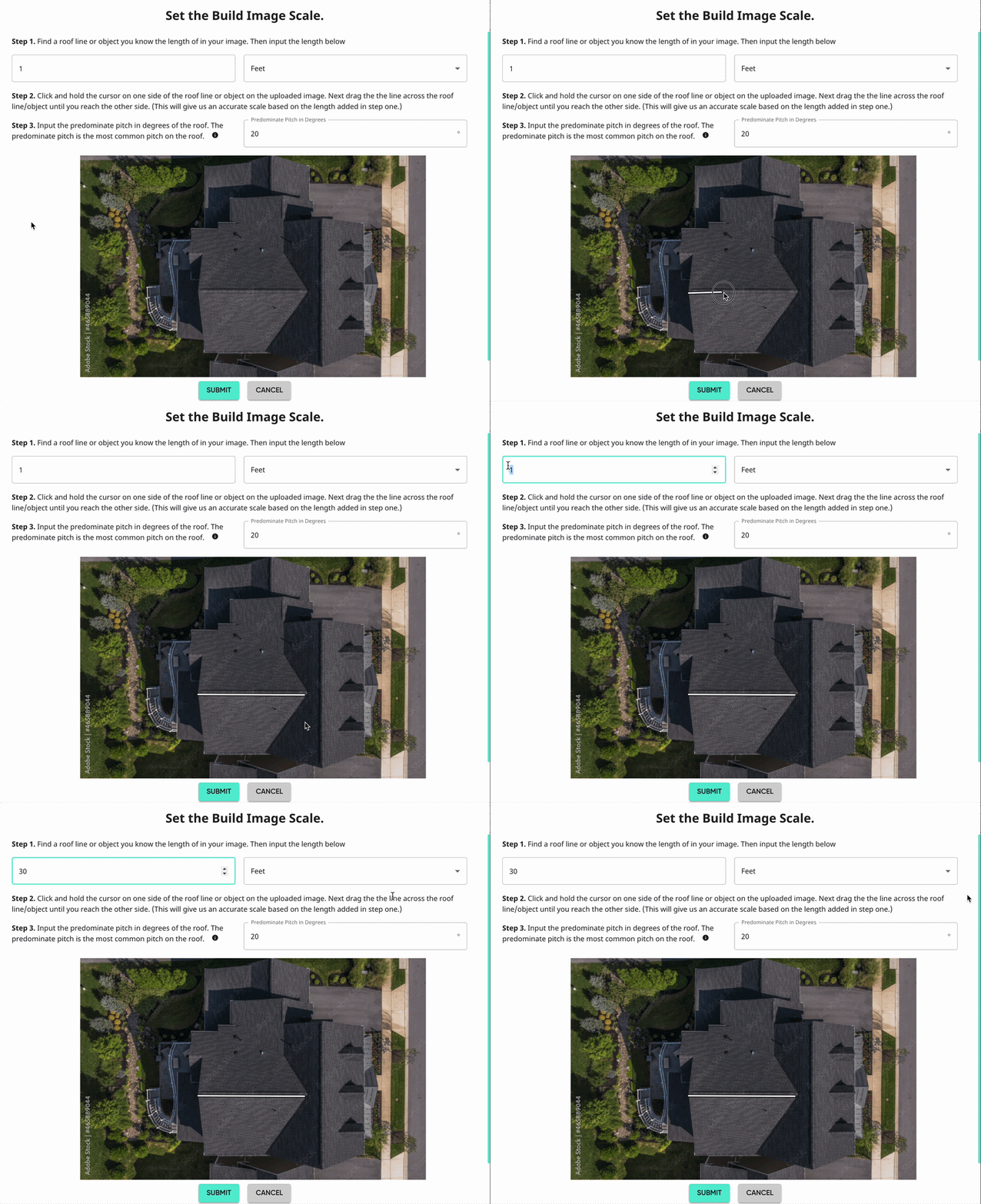
- Input the measurement of the roofline/object and the roof's predominant pitch in degrees.
- Once finished, press 'Submit'.
- The uploaded build image will not appear in the customer files, but it will still be available for designs.
Please note: If our design team comes back stating they cannot use the custom build image, it may be due to a few reasons:
- it was not uploaded as a Custom Build Image, but was just uploaded as a normal file.
- it was uploaded as a PDF or JPEG/JPG (a file type that the tool doesn't recognize).
- the scaling was incorrect during the initial upload and will need to be re-scaled/re-uploaded.
Custom build images can also be uploaded on step 2 of the customer creation process.
Requesting a "Blind" Build
Please Note: Designs created through this method may experience longer design times.
When a top-down, aerial image is not available, a design can be approximated through what we call a 'blind' build. Using images of each roof plane, taken at a ground level, the Solo design team will estimate a layout as best as we can.
To complete a blind build design, our team will need the following information:
- An image of each roof plane and/or an aerial image of the roof uploaded to the customer files. These will give our designers and understanding of the roof layout.
- What direction the home is facing. This will ensure that each roof plane is getting accurate production estimates for it's respective azimuth.
- If possible, measurements of each roof plane to help our designers more accurately scale the design to the customer's roof.
- Without measurements, we may not be able to accurately scale the design, but will do the best with the information provided and our designer's experience.
Note: The imagery uploaded for a blind build will not be the imagery that the design is built over. Instead, the system will be designed based on those images, but still displayed over the imagery that we do have available.